Your tool should fit
the rest of your business.
Email is one part of a bigger business. A purchase from your store, a hot lead for sales, a failed payment, a renewed plan: the signals worth acting on live outside your email platform. RadarSend brings them in and acts on them.
Keep the systems you have. RadarSend doesn't ask you to rebuild your business around it.
Nearly anything can be added to the contact's story.
Send events from your server through the API, or record them in the browser with the JavaScript snippet already on your site. Call _qp.track() when someone does something worth knowing, and _qp.identify() at login or checkout. Once a visitor is identified, the pages they read before that attach to their record too.
Every event lands on the contact's timeline next to their email and website activity, where segments, sequences, automations, and scores can act on it.
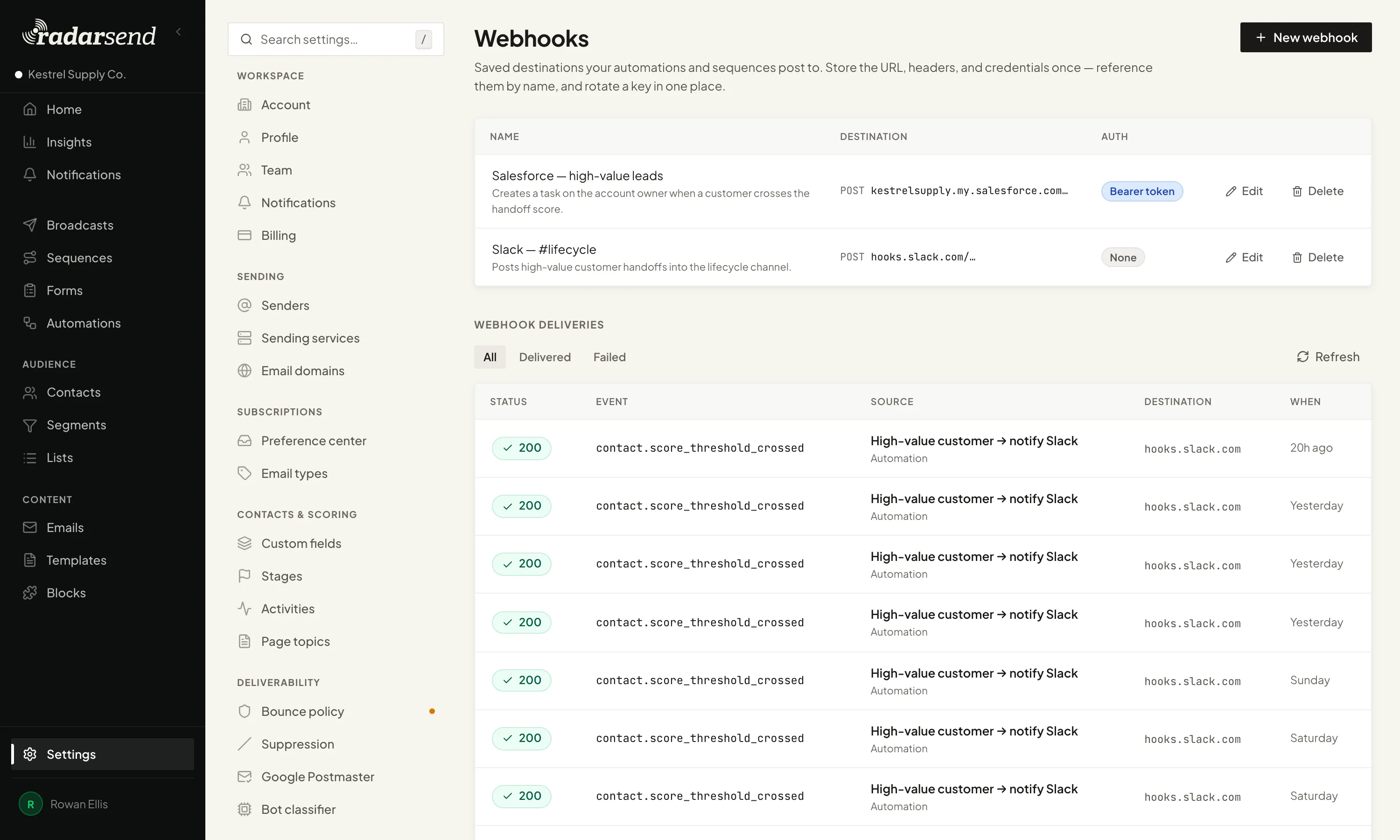
It goes both ways. Automations and sequences can send webhooks to your CRM, Slack, or anything with an endpoint. They use filtered activity, so a security scanner clicking a link doesn't notify your sales team.
// At login or checkout
_qp.identify('jamie@example.com');

// When something worth knowing happens
_qp.track('demo_video_watched', { video: 'Product tour' });- AutomationsWhen a lead gets hot, send it to your CRM or post it to Slack. Score thresholds, segment changes, and activities can all post a webhook.
- SequencesAdd an Action step that calls a webhook at that point in the path.
- Purchases and refundsWith the product and the amount
- Renewals and cancellationsIncluding WooCommerce Subscriptions changes
- Failed paymentsAs they happen
- Signups and loginsMatched to the right contact
- Form submissionsFrom the forms you already run
- Pages read on your siteFirst-party, on your own domain
WordPress without the wiring.
On any site, add the RadarSend tracking snippet. On WordPress, install the plugin and connect your account instead. It adds first-party site tracking, syncs contacts, and records signups and logins without wiring each event by hand.
If you run WooCommerce, including WooCommerce Subscriptions, purchases, refunds, failed payments, renewals, cancellations, and subscription changes land on the right contact's record.
Your AI assistant already knows how to use it.
RadarSend's MCP server lets Claude, ChatGPT, or any assistant that supports MCP work with your account directly, including creating an email draft inside RadarSend.
Your templates already define what goes where: which fields, what type, how long, which image slots, and which content blocks. The assistant reads those rules, fills in the template, checks its work against them, and hands you a finished draft in your design.
Connect it to your content too, like your blog or website, and the weekly newsletter starts from the posts you already published.



curl -X POST https://app.sonarsend.com/t/kestrel-supply/api/events \
  -H "X-API-Key: $API_KEY" \
  -H "Content-Type: application/json" \
  -d '{
    "contact_email": "jamie@example.com",
    "event_name": "subscription_renewed",
    "type": "renewal",
    "properties": {
      "subscription_id": "sub_987",
      "product_name": "Pro Plan",
      "value": 99.00,
      "currency": "USD"
    }
  }'
curl -X POST https://app.sonarsend.com/t/kestrel-supply/api/broadcasts \
-H "X-API-Key: $API_KEY" \
-H "Content-Type: application/json" \
-H "Idempotency-Key: $(uuidgen)" \
-d '{
"name": "The Fieldnotes #48",
"email_type_key": "weekly_newsletter",
"include_segment_keys": ["all-subscribers"],
"content": {
"template_slug": "fieldnotes-weekly",
"template_binding": {
"parameters": { "preview_text": "Eleven days on the coast path" }
}
}
}'curl -X PUT https://app.sonarsend.com/t/kestrel-supply/api/contacts \
-H "X-API-Key: $API_KEY" \
-H "Content-Type: application/json" \
-d '{
"email": "jamie@example.com",
"first_name": "Jamie",
"custom_fields": { "plan_tier": "pro" }
}'An API for everything else.
Use the REST API, or the JavaScript snippet in the browser, to create contacts from your signup flow, build email drafts from your CMS, enroll someone in a sequence when they act in your product, suppress an address, or add data you track in other systems.
- Scoped keys. Give each key only the access it needs, then rotate or revoke it without touching your other connections.
- Webhooks. Send them from automations and sequence steps, and see whether each delivery arrived.
- Safe retries. Idempotency keys keep a retried request from running twice.
- MCP. The same access, available to AI assistants.
Your email tool doesn't need to run everything.
Keep customer records in your CRM and orders in your store. RadarSend takes in what your emails need, keeps it with the right contact, and sends useful results back.
You don't have to buy an all-in-one platform just to keep your email connected to the rest of your business.